
What You Actually Do
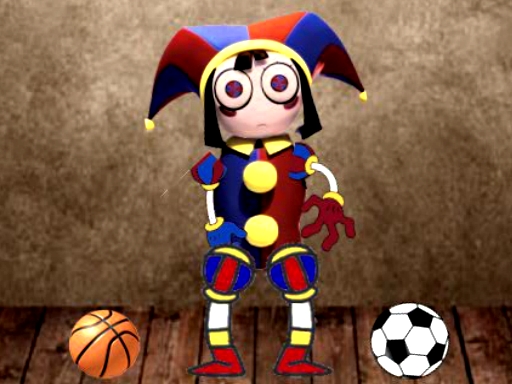
Pomni Creative Arcade Game is built around four hands-on activities: coloring the character, stacking boxes, applying face distortion effects, and dragging Pomni around the screen. Each task uses simple mouse or touch input. Clicking a coloring tool changes Pomni's appearance, dragging items lets you organize boxes, and distortion effects alter facial expressions for playful results. The game responds immediately, so there is no lag between action and outcome. Nothing here requires memorizing instructions or completing levels. You switch between activities whenever you want, which keeps the pace entirely under your control.
How the Activities Differ
Coloring mode offers a range of colors for customizing Pomni's look. Box stocking is a spatial organizing task where you drag and place items. Face distortion works as a playful expression tool rather than a challenge. The drag feature moves Pomni freely around the screen. These are separate, self-contained interactions — not a progression system. [IMG_1] Each one is intuitive enough to figure out by trying it. The variety matters because it prevents any single activity from wearing out its welcome during a short session.
Who This Suits
Because there are no timers, scores, or failure states, the game fits short breaks and longer casual sessions equally well. It is safe for all ages and runs directly in a browser without a download. If you want a structured arcade challenge with escalating difficulty, this is not that. If you want a low-pressure creative toy where you set the pace, the four activities cover enough ground to stay engaging without demanding anything from you.







Comments
0 comments