Freeway Dash 3D: Speed Runner

Freeway Dash 3D: Speed Runner

Developer: Duelfall Labs
Updated: 2026-10-01
Driving Racing Arcade

Reviews

Freeway Dash 3D: Speed Runner strips racing down to steering and timing. Automatic acceleration removes pedal work, so success depends on reading traffic and choosing when to use speed boosts. The gradual difficulty curve and distinct track layouts give it more depth than a typical browser racer. It suits casual players and younger audiences, though those wanting deep customization or multiplayer will find it limited.

About this game

Automatic Acceleration, Manual Steering

Freeway Dash 3D: Speed Runner puts you behind the wheel of a car that accelerates on its own. Your only inputs are steering left and right, which shifts the focus from pedal management to lane positioning and timing. The goal is to finish first by weaving through other vehicles without crashing. Because the car never slows unless you choose to, every lane change carries weight.

Reading Traffic and Using Boosts

The highway is a moving obstacle course. Cars appear in patterns that change from race to race, so you cannot memorize a single route. Speed boosts sit on the road and give a temporary burst of acceleration when collected. Grabbing one at the right moment can pull you ahead; grabbing one in heavy traffic can push you into a collision. The game rewards players who anticipate gaps, plan two moves ahead, and occasionally ease off rather than force a risky pass.

Progression Through Denser Races

Finishing well unlocks new stages. Later tracks introduce tighter traffic and more aggressive AI opponents, which demand sharper reactions and better route planning. The difficulty climbs gradually, so beginners can learn the basics while experienced players still find a real test. Each new track has its own road layout and traffic density, which keeps the racing from feeling identical.

Controls, Visuals, and Browser Access

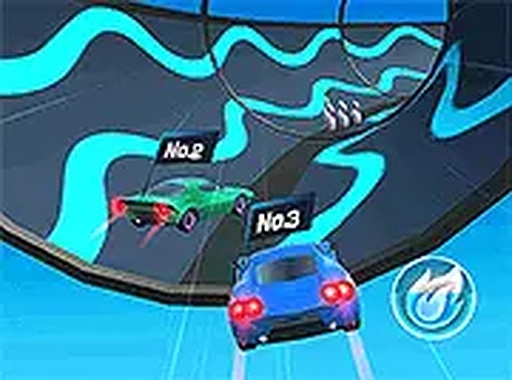
On desktop, arrow keys steer the car. On mobile, on-screen buttons do the same job. No download or installation is needed; the game runs in a web browser on computers and smartphones. The 3D view shows the highway clearly, with bright colors and distinct vehicle shapes that help you spot obstacles and pickups. A flash signals a collected boost, and a screen shake marks a collision. The interface stays uncluttered, showing position and race progress without blocking the road ahead.

Editorial Notes

Compatibility

Play on Any Device | Chrome / Safari / Edge Recommended
FAQ

Can I play Freeway Dash 3D: Speed Runner without downloading anything?
Yes. The game runs directly in a web browser on both computers and smartphones. There is no installation step, so you can open it and start racing. This makes it convenient for quick sessions, though you will need a stable internet connection to load and play.
Does Freeway Dash 3D: Speed Runner have a multiplayer mode?
The provided description does not mention multiplayer. It focuses on single-player races against AI opponents and traffic. If you are looking for online competition against other people, this game does not appear to offer that based on the available information.
How do speed boosts work in Freeway Dash 3D: Speed Runner?
Speed boosts are collectible items on the road. Driving over one gives a temporary burst of acceleration. Using a boost in open lanes helps you gain ground, but activating one in dense traffic can be risky. Timing matters as much as collecting them.
Is Freeway Dash 3D: Speed Runner suitable for younger players?
The controls are simple: steer left and right with arrow keys or on-screen buttons. Acceleration is automatic, so there are no complex pedal controls. This makes the game accessible to younger audiences and casual players, though later stages with denser traffic may still require quick reactions.
What happens when I crash in Freeway Dash 3D: Speed Runner?
The description mentions a screen shake upon collision, which provides immediate feedback. It does not specify whether a crash ends the race, costs time, or triggers a reset. Based on the available information, a collision is a setback that you should avoid to maintain your position.
How does the difficulty increase in Freeway Dash 3D: Speed Runner?
As you complete races and place well, you unlock new stages. Later levels feature denser traffic and more aggressive AI opponents. The game ramps up gradually, so newcomers can learn the basics while experienced players face a genuine challenge. Each track has distinct road layouts and traffic patterns.

Comments

0 comments
U
User
★ ★ ★ ★ ★
Loading comments...

Similar Games

Gravity Runner

Skill Reflex Timing

PLAY NOW

Speed Champions Racing Game

Driving Racing 2D Racing

PLAY NOW

Tunnel Maze Reflex Puzzle

Reflex Puzzle Arcade

PLAY NOW

Bounce Up

Skill Arcade Pogo Stick

PLAY NOW

Pix Hop Platform Adventure

Skill Platform Arcade

PLAY NOW

Armadillo Leap

skill platformer arcade

PLAY NOW

Color Path Arcade Game

Skill Color Matching Reflex

PLAY NOW

ZigZag Path

Skill Reflexes Timing

PLAY NOW