Keyboard Planet Puzzle

Keyboard Planet Puzzle

Developer: Lake Veil Digital
Updated: 2026-10-01
Puzzle Adventure Educational

Reviews

Keyboard Planet Puzzle earns its educational tag by making typing the core interaction rather than a gimmick. The retro sci-fi setting and clean on-screen prompts keep attention on the keys, while the gradual increase in sequence length and obstacle speed provides a fair but demanding curve. Desktop-only keyboard controls limit its audience, but for players seeking a free browser-based typing challenge with a nostalgic look, it offers a coherent and specific experience.

About this game

Typing as a Core Movement Tool

Keyboard Planet Puzzle does not treat typing as a side activity. The keyboard is your only input device, and every obstacle demands a specific letter or short word before it disappears. You move across the terrain, then stop to type the required sequence. Some barriers appear while you are mid-jump or while moving hazards close in, so the game regularly asks you to split attention between navigation and accurate typing.

Progression Through Speed and Sequence Length

Early stages stick to single letters and brief words. As you advance, the game lengthens the required sequences and speeds up the moving obstacles. That combination raises the cost of a mistyped key. The difficulty curve is gradual, but later sections expect consistent accuracy rather than occasional bursts of speed. Players who need to look down at the keyboard will feel the pressure more than touch typists.

Pixel Art and Interface Design

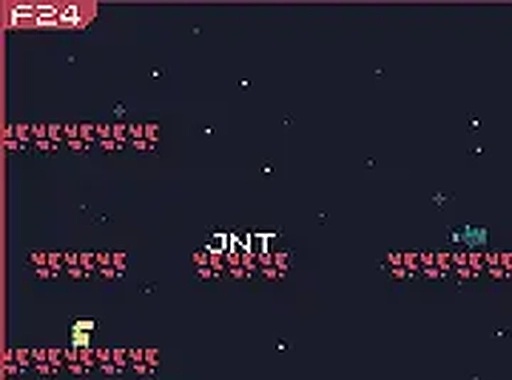
The visual style uses pixel art with distinct color palettes for different areas, ranging from rocky caves to alien forests. Background details change between zones, which helps break up the planet into recognizable regions. A clean interface shows on-screen prompts for the next keys to press, keeping the typing task visible without cluttering the play area. Full-screen mode is available for a more focused session.

Who This Suits and How to Access It

This is a desktop-only experience. A physical keyboard is required, and there is no mouse or touch support. The game runs directly in a browser with no installation. It suits players who enjoy educational puzzles, retro aesthetics, or typing practice wrapped in a light adventure structure. It is free to play, and the keyboard-only control scheme makes it easy to start without learning complex inputs.

Editorial Notes

Compatibility

๐Ÿ’ป Desktop | ๐Ÿ“ฑ Mobile | ๐Ÿ“Ÿ Tablet
โ€“ All supported ยท Best with Chrome or Safari

FAQ

Does Keyboard Planet Puzzle require any special software or downloads?
No. The game runs directly in a web browser and needs no installation. You only need a desktop or laptop with a physical keyboard. There is no mouse or touch input, so phones and tablets are not suitable for playing it.
Is Keyboard Planet Puzzle suitable for children or typing beginners?
The educational tag and gradual difficulty curve suggest it can work for beginners, especially in early levels that use single letters and short words. Later stages demand faster typing and longer sequences, so younger players may need adult help or extra practice to progress.
Can I play Keyboard Planet Puzzle on a mobile device?
The game is designed for desktop computers with a physical keyboard. No mouse or touch input is required or supported. Mobile devices lack the necessary keyboard input, so the game is not playable on phones or tablets.
How does the game handle difficulty as you progress?
Early levels introduce basic letter recognition and short words. As you advance, the game increases the speed of obstacles and the length of typing sequences. This gradual ramp builds confidence, but later stages require consistent attention and practice to master.
What makes Keyboard Planet Puzzle different from other typing games?
It combines traditional platform navigation with typing challenges. You guide a character across terrain while encountering barriers that only disappear after typing the correct sequence. Some sections require typing while jumping or dodging hazards, which keeps both mind and fingers engaged.
Is there a full-screen mode in Keyboard Planet Puzzle?
Yes. The game supports full-screen mode for a more focused experience. This can help reduce distractions when typing longer sequences or when obstacles speed up in later levels. You can switch to full-screen directly in the browser.

Comments

0 comments
U
User
★ ★ ★ ★ ★
Loading comments...

Similar Games

Clever Escape Puzzle

Puzzle Strategy Stealth

PLAY NOW

Little Dentist Kids Dental Care

Kids Educational Dentist

PLAY NOW

Pumpkin Toss Precision Game

Precision Arcade Casual

PLAY NOW

Shape Attraction Puzzle

Puzzle Logic Observation

PLAY NOW

Bubble Link Puzzle

Puzzle Matching Casual

PLAY NOW