
Two Creative Modes, One Session
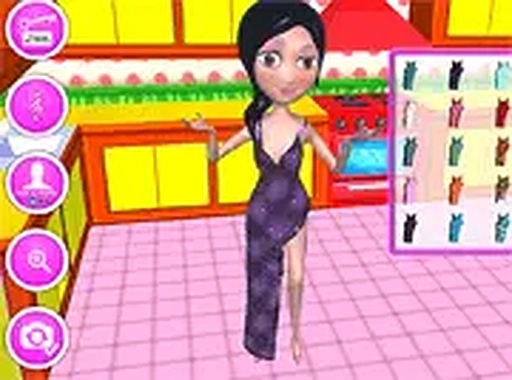
Kim's 3D Fashion and Room Decor splits its play into two connected activities: styling Kim and decorating her surroundings. You begin with the wardrobe, selecting from tops, bottoms, shoes, jewelry, and accessories to assemble an outfit. Once that look is set, the game shifts to interior design mode, where the same character you dressed becomes the focal point of a room you build yourself. [IMG_1]
How the Dress-Up Flow Works
Clothing and accessory options appear in selection menus, and you click and drag items onto Kim to apply them. There is no timer or scoring pressure, so the pace is entirely yours. Mixing categories matters: a top, a bottom, shoes, and jewelry each contribute to the final look, which means small swaps can change the whole outfit. The interface keeps every category visible, letting you compare combinations without leaving the screen. [IMG_2]
Designing the Five Rooms
Decoration mode covers five separate spaces: a drawing room, a bedroom, a kitchen, a lobby, and a small garden. In each one you choose furniture, wall colors, and decorative items, so the rooms can follow completely different themes. Because the five spaces serve different purposes, the furniture sets and color palettes you pick for a bedroom will look out of place in a garden, and the game gives you room to treat each area independently. [IMG_3]
Capturing the Finished Look
When both the outfit and the room are ready, a camera feature lets you take a selfie of Kim inside the decorated setting. This closes the loop between the two modes: the styling choices and the room choices appear together in one image. You can use the camera after any combination, so it doubles as a way to compare designs before committing to a favorite. [IMG_4]
Practical Details
The game runs directly in a web browser and requires no download. It is built for desktop play, with mouse and keyboard input, and supports full screen mode for a larger view of the rooms. It is free to play and aimed at children and anyone who enjoys fashion or interior design. The controls are simple enough that no tutorial is needed: click, drag, and place. [IMG_5]







Comments
0 comments