Kim's 3D Fashion and Room Decor

Kim's 3D Fashion and Room Decor

Developer: Sprite Veil Digital
Published: 1759507200
Updated: 2026-09-30
Fashion Decoration Creative

Reviews

Kim's 3D Fashion and Room Decor targets players who enjoy unhurried creative choices rather than goals or scoring. Its two linked modes, dressing Kim and decorating five rooms, feed into each other through a camera feature that photographs the final result. The browser-based, desktop-only design keeps setup simple, though the lack of mobile support and any stated save system are real limitations. Best suited to children and casual design fans.

About this game

Two Creative Modes, One Session

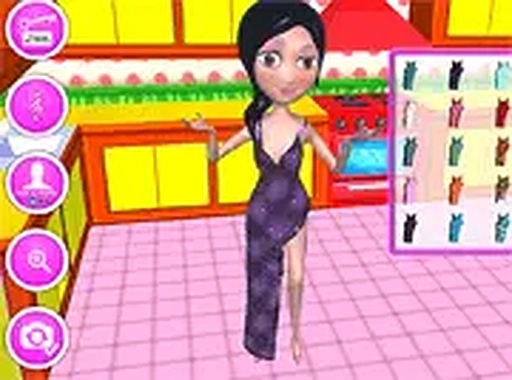
Kim's 3D Fashion and Room Decor splits its play into two connected activities: styling Kim and decorating her surroundings. You begin with the wardrobe, selecting from tops, bottoms, shoes, jewelry, and accessories to assemble an outfit. Once that look is set, the game shifts to interior design mode, where the same character you dressed becomes the focal point of a room you build yourself. [IMG_1]

How the Dress-Up Flow Works

Clothing and accessory options appear in selection menus, and you click and drag items onto Kim to apply them. There is no timer or scoring pressure, so the pace is entirely yours. Mixing categories matters: a top, a bottom, shoes, and jewelry each contribute to the final look, which means small swaps can change the whole outfit. The interface keeps every category visible, letting you compare combinations without leaving the screen. [IMG_2]

Designing the Five Rooms

Decoration mode covers five separate spaces: a drawing room, a bedroom, a kitchen, a lobby, and a small garden. In each one you choose furniture, wall colors, and decorative items, so the rooms can follow completely different themes. Because the five spaces serve different purposes, the furniture sets and color palettes you pick for a bedroom will look out of place in a garden, and the game gives you room to treat each area independently. [IMG_3]

Capturing the Finished Look

When both the outfit and the room are ready, a camera feature lets you take a selfie of Kim inside the decorated setting. This closes the loop between the two modes: the styling choices and the room choices appear together in one image. You can use the camera after any combination, so it doubles as a way to compare designs before committing to a favorite. [IMG_4]

Practical Details

The game runs directly in a web browser and requires no download. It is built for desktop play, with mouse and keyboard input, and supports full screen mode for a larger view of the rooms. It is free to play and aimed at children and anyone who enjoys fashion or interior design. The controls are simple enough that no tutorial is needed: click, drag, and place. [IMG_5]

Editorial Notes

Compatibility

This H5 game runs smoothly on:
• Desktop computers (Windows / Mac) • Mobile phones (iPhone / Android)
• Tablets (iPad / Android)
🌐 Best experienced with Chrome, Safari, or Edge

FAQ

Do I need to download anything to play Kim's 3D Fashion and Room Decor?
No. The game runs entirely in a web browser, so there is no installation step and no download required. You open the page and start playing. It is built for desktop computers and supports a full screen mode if you want a larger view of Kim and the rooms while you work on outfits or furniture layouts.
Can I play Kim's 3D Fashion and Room Decor on a phone or tablet?
The game is designed for desktop play with a mouse or keyboard, and the input method is click-and-drag. That control scheme does not translate well to touchscreens, and the description does not list mobile support. For the intended experience, use a desktop or laptop browser rather than a phone or tablet.
How many rooms can I decorate in Kim's 3D Fashion and Room Decor?
There are five rooms available: a drawing room, a bedroom, a kitchen, a lobby, and a small garden. Each one accepts its own furniture, wall colors, and decorations, so you can give every space a separate theme. The garden in particular calls for different choices than an indoor room, which encourages you to plan each area on its own terms.
What clothing categories are available when dressing Kim?
The wardrobe covers tops, bottoms, shoes, jewelry, and accessories. Each category appears in a selection menu, and you click and drag items onto Kim to apply them. Because the categories are separate, you can change just one piece, such as swapping shoes or adding jewelry, without rebuilding the entire outfit from scratch.
Is there a way to save or share the outfits and rooms I create?
The camera feature lets you take a selfie of Kim inside the decorated room once the outfit and space are finished. That captured image is the game's way of recording your work, and the input notes you can share it with friends. There is no separate save system mentioned beyond this selfie function, so capture a shot before changing your design.
Is Kim's 3D Fashion and Room Decor free, and who is it meant for?
The game is completely free to play. It is described as suitable for children and for anyone who enjoys fashion or interior design. There is no combat, timer, or competitive element, so the appeal comes from experimenting with color, clothing, and furniture combinations at your own pace rather than from challenge or progression systems.

Comments

0 comments
U
User
★ ★ ★ ★ ★
Loading comments...

Similar Games

Gravity Runner

Skill Reflex Timing

PLAY NOW

Single Line Animal Drawing Puzzle

Puzzle Drawing One-Stroke Puzzle

PLAY NOW

Complete the Picture Puzzle

Puzzle Logic Creative

PLAY NOW

Stickman Puzzle Remove

Skill Physics Puzzle Clicking

PLAY NOW

Panda Parkour Adventure

Skill Platforming Family

PLAY NOW

Armadillo Leap

skill platformer arcade

PLAY NOW

Color Path Arcade Game

Skill Color Matching Reflex

PLAY NOW